Never miss an HVAC warranty registration again
Close the job in Jobber. Warranty Autofill lines up every unit that needs registering, shows the deadline, and fills the manufacturer's form for you in one click. You check it and press Submit.
How it works
Your tech types the serial numbers and picks the brand on the job. Two fields are added to your jobs automatically.
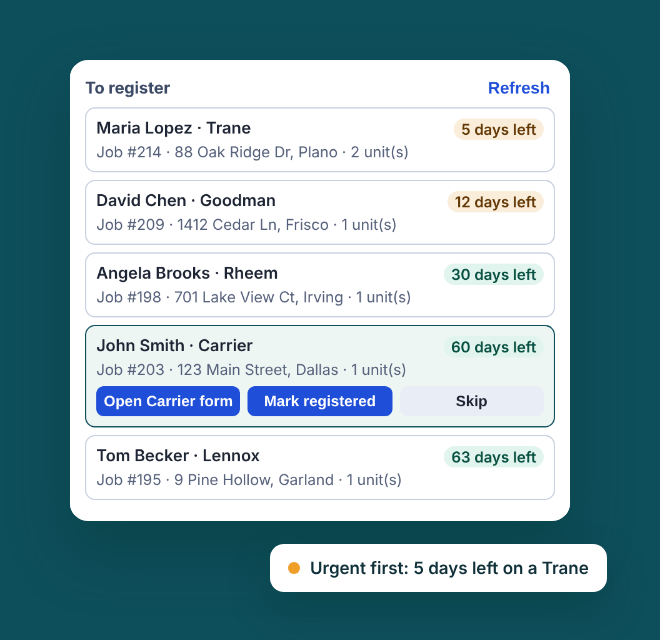
The unit appears in the extension's "To register" list with the customer, address and the days left to register.
Open the manufacturer's site and press "Fill this step". Review, then submit it yourself. We never submit for you.
Works with these brands
Brand names belong to their owners. Warranty Autofill is an independent tool and is not affiliated with Jobber or any manufacturer.
Pricing
- 3 jobs a month
- Full "To register" list with deadlines
- All supported brands
- Unlimited jobs
- Everything in Free
- Cancel any time
How to upgrade: open the Warranty Autofill side panel in Chrome and press Upgrade · $29/mo. You will go to the secure checkout of Freemius, our reseller.
A "job" is one set of equipment (for example an outdoor unit and its furnace). Filling the same job again, or a form with several steps, counts once. Orders are processed by Freemius, our online reseller and Merchant of Record, which handles payment, sales tax and invoices. You are charged in US dollars.
Questions
Do you submit registrations for me?
No. The extension fills the form on the page you have open. You check it, tick any agreements and press Submit yourself.
What do I need?
Google Chrome on a computer and a Jobber account. Custom job fields need Jobber Connect or higher; on other plans you can type serial numbers into the extension.
How do I cancel?
Press Cancel in the extension's side panel, or email hello@mi-companion.com. Cancelling stops future charges; Pro stays on until the end of the month you paid for.
Refunds
If you were charged by mistake or Pro did not work for you, email hello@mi-companion.com within 14 days of the charge and we will refund it in full. Refund and cancellation policy.
What happens to my data?
Job details stay in your browser. If you connect Jobber we read completed jobs with serial numbers, read-only. Disconnecting deletes your data. See the Privacy Policy.